

Everyone with a Platform seat can open Activity.
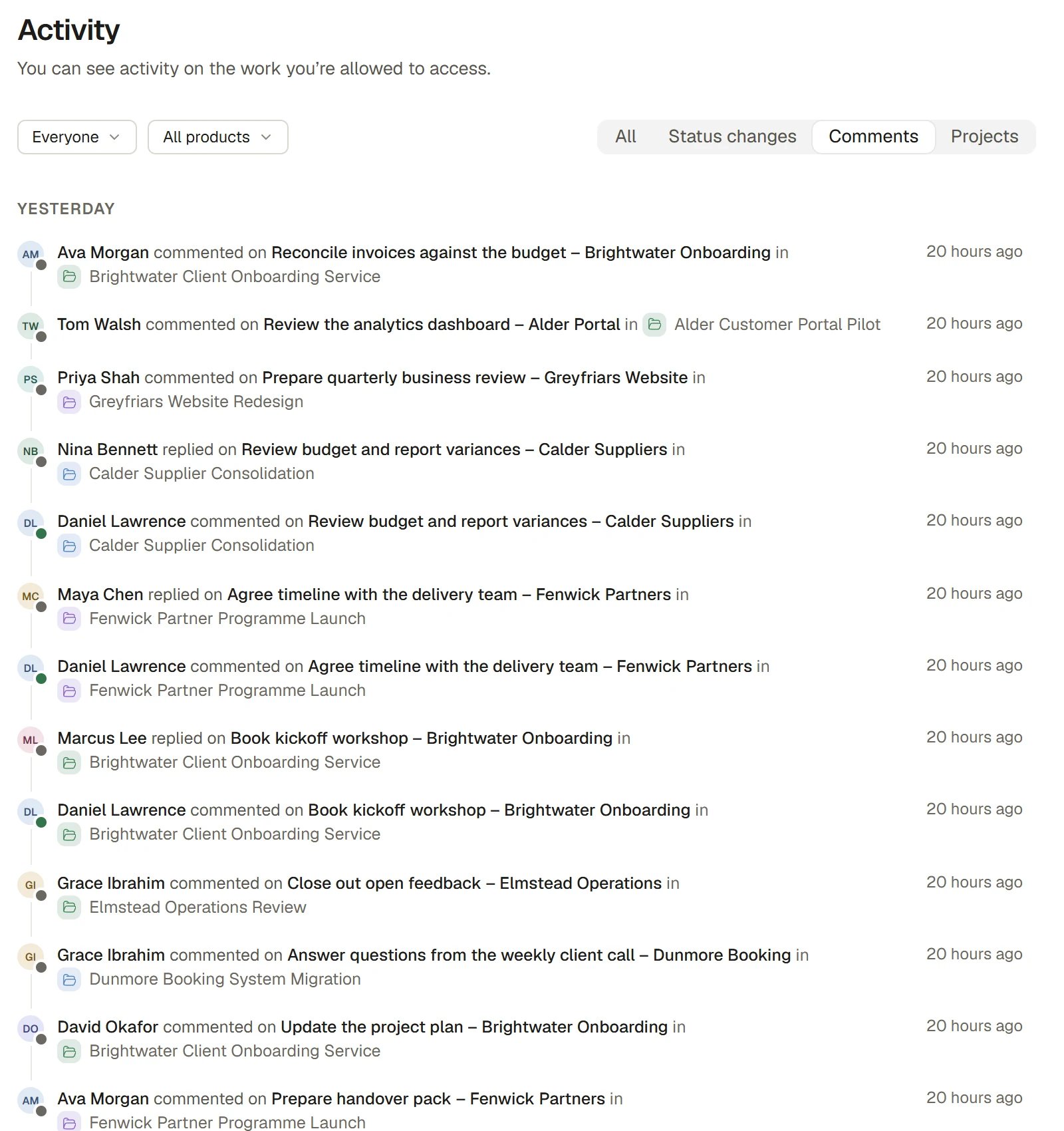
Activity on your work
Read the feed
1
Open Activity
Choose Activity in the Workspace group of the sidebar. Changes are grouped by the Organisation’s day under Today, Yesterday, This week and Earlier, newest first.
2
Read a line
Each line shows the person, a sentence such as “completed Pour slab”, the thing it is about, the Project it happened in and when. Hover over a person’s face for their card, which shows their status or whether they are online.
3
Open what changed
Select the subject to open it: a record opens in the record panel, and a Project opens on its own screen.
4
Load more
When you reach the end of what is shown, the feed loads the next page. If your access thins the results, it still says there is more and carries on as you scroll. Where it cannot go further it says “Nothing here in the most recent activity.”
Filter the feed
The bar above the feed narrows it.
When a filter leaves nothing, the feed says so and offers to clear it.
Activity on a Project and on a record
- A Project’s Activity tab is this feed locked to the Project. A chip says “This page shows only this project’s activity”, and it cannot be taken off. See Projects.
- A record’s Activity tab, at the foot of its panel, is a plain log of that record: one line each for who did what and when, with no filters. See Record panel and attachments.
- A product’s Activity tab is this feed with the product locked on.
Why the sentences are plain
Activity is written to be read, not decoded. It names the person, says what they did, and names the thing. For example, “Priya set the due date of Pour slab to 12 March” or “imported 120 new Opportunities via Claude”. An import is one line, not 120, and the records keep their own history.See who is around
Presence is the small dot and line you see by a person’s face on Activity, in pickers, in the Members list and on their card.
Presence never shows “Away” or a person’s working hours. Only members have a presence. A Contact never does.
Set your own presence
Open your account menu at the foot of the sidebar.- Set a status offers one-click presets (In a meeting, Commuting, Focusing, Off sick, Working remotely) that clear on their own, or Custom… to pick an emoji, write up to 100 characters and choose when it clears: not at all, 30 minutes, 1 hour, 4 hours, today or this week. Clear status removes it.
- Do not disturb pauses desktop, phone and email notifications for 1 hour, until tomorrow, or until a time you choose. Your Inbox still fills. Turn off Do not disturb ends it early.
- Appear away hides your activity so others see you as not online.
How it works
- Activity shows only changes to work you are allowed to open. Organisation Admins also have a fuller audit history of people, identity and configuration changes in Settings > Audit.
- Live. When someone changes something you can see, it appears in the feed as it happens, without a refresh.
- Your access applies. The feed is built from the one activity log with your access already applied. You never see a line about work you cannot open.
- Grouped by your Organisation’s day, not your browser’s, so everyone in the Organisation reads the same “Yesterday”.
- Undo. Your own latest changes can be taken back with Ctrl+Z (Cmd+Z on a Mac) or the Undo on the message that follows them.
Ask Beacon
- “What changed on the Harbour Road Project this week?”
- “Show me everything Priya completed yesterday.”
FAQ
Why can I not see a change a colleague mentioned?
Why can I not see a change a colleague mentioned?
You may not be able to open the work it was about. Activity shows only changes to work you can open.
What is the difference between Activity and the Inbox?
What is the difference between Activity and the Inbox?
Activity is everything that changed in the work you can open. The Inbox is only what is addressed to you or happens to work you follow.
Can I stop people seeing when I was last online?
Can I stop people seeing when I was last online?
Yes. Turn on Appear away in your account menu.
Where is the history of people and permission changes?
Where is the history of people and permission changes?
In Settings > Audit, which is for Organisation Admins. See Audit.
Related
- Inbox and notifications: What is addressed to you.
- Projects: A Project’s own Activity tab.
- Record panel and attachments: A single record’s log.
- Audit: The Admin history of people and configuration changes.