

CRM seat holders create and change Leads.
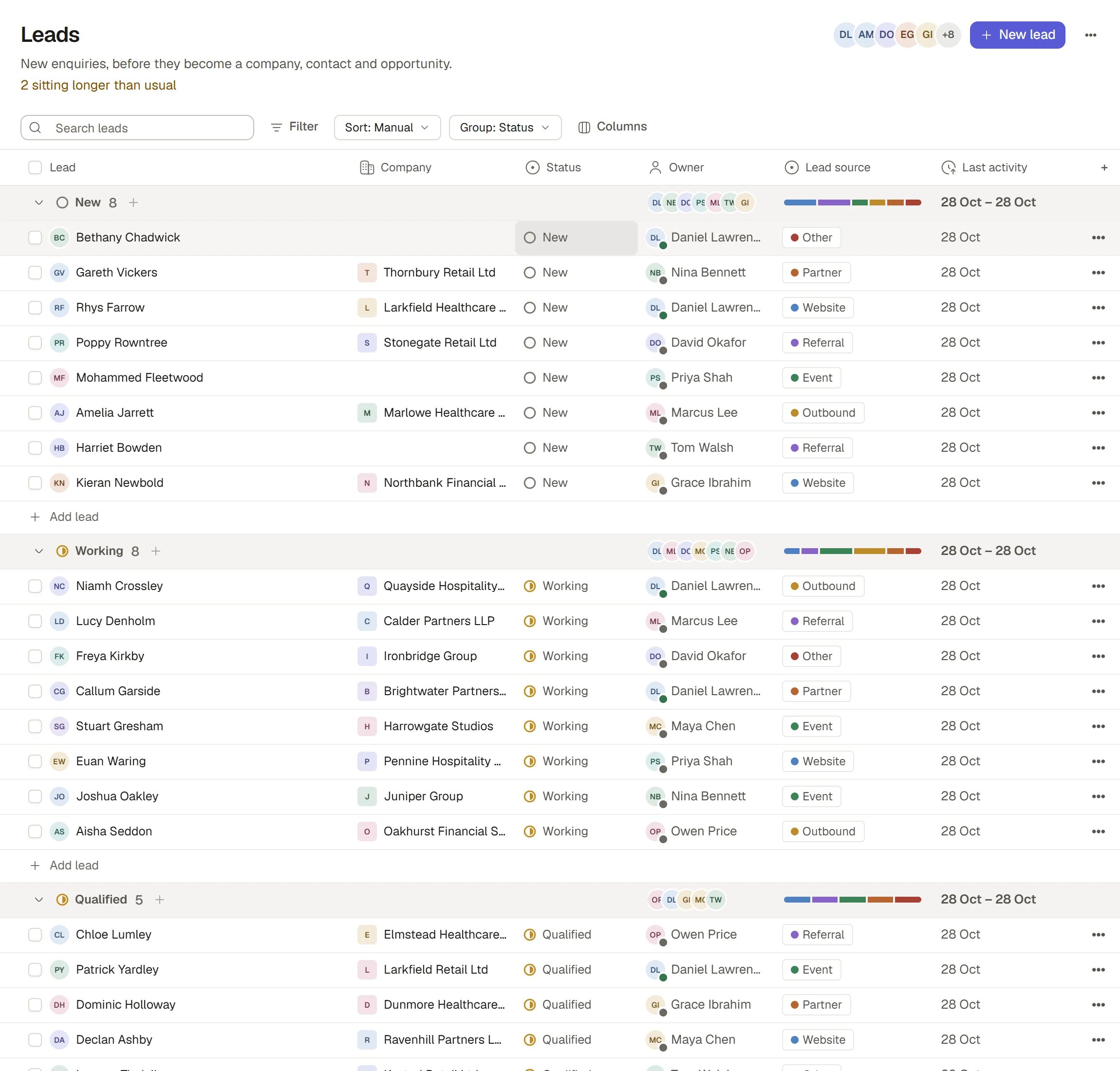
Leads by status
Before you start
A Lead names its Company as a link to one of your Organisation’s Companies, never as typed words. If the company is new, add it under Companies first. See Companies and people.Add a Lead
1
Open Leads
In CRM’s sidebar, choose Leads under Pipeline. The board is grouped by Status.
2
Choose New
The New button in the toolbar opens a short form: Name, Company, Email, Lead source and Owner. Open the form’s extra details for Phone.
3
Save
The Lead starts as New.
Work a Lead
A Lead moves through its Status.
Change the Status in its cell on the board, or in the record panel. Other fields are Owner, Lead source (Website, Referral, Event, Outbound, Partner or Other), Email and Phone. Last activity is worked out for you from what has been said and logged on the Lead.
Notes about a Lead are comments on it. Open the Lead to read and add them.
Disqualify a Lead
Choose Disqualified. Saphion asks for a Disqualified reason: Not a fit, No budget, No response, Duplicate or Other. You can refine the reason afterwards. A disqualified Lead remembers the open status it came from. Choose Reopen to put it back there.Convert a Lead
Convert a Lead when it is real. Open the Lead and choose Convert at the top of its panel. It is offered for a Lead that is New, Working or Qualified.1
Choose Convert
The New opportunity dialog opens, filled in from the Lead: its name, Company, Owner and Lead source.
2
Complete the Opportunity
Give it a name, and add a value, Expected close and Contact if you know them. To use an existing Contact or Company, choose it here. Otherwise the Contact is made for you from the Lead’s name, email and phone, under its Company.
3
Choose Create
Saphion does everything in one go. If anything is refused, nothing is left half done.
- links the Lead to its Company;
- creates the Contact under that Company, or links the one you chose;
- creates the Opportunity, at the first open stage unless you picked another, carrying the Lead’s owner and source;
- copies the Lead’s conversation onto the Contact and the Opportunity, keeping who said what and when;
- closes the Lead as Converted.
If conversion is refused
How it works
- A converted Lead is closed. A Lead that has been converted can no longer be changed by anyone.
- A Lead is a record on a board, so everything in Boards, tables and views applies: Filter, Sort, Group, search, columns and import.
- A Lead has a person’s round face beside its name until it is converted.
- Retrying a conversion that was interrupted replays it; it never makes duplicates.
Ask Beacon
- “Add a Lead called Northgate Developments, referred by Priya, owned by me.”
- “Which Leads have been Working for more than two weeks?”
FAQ
Why can I not type the company name on a Lead?
Why can I not type the company name on a Lead?
A Lead links to a Company that already exists, so a typed name never creates a duplicate. Add the Company under Companies, then choose it on the Lead.
Can I convert several Leads at once?
Can I convert several Leads at once?
No. Conversion is one Lead at a time, because each creates an Opportunity you name.
Can I undo a conversion?
Can I undo a conversion?
No. A converted Lead stays as the record of where the Company, Contact and Opportunity came from, and it cannot be reopened. Change the Opportunity or Contact it made instead.
Where do disqualified Leads go?
Where do disqualified Leads go?
They stay in Leads under Disqualified, with the reason, so you can see how many you turned away and why.
Related
- Opportunities and pipeline: What a Lead becomes.
- CRM overview: How CRM is laid out.
- Companies and people: Companies and Contacts.
- CRM settings: Change Lead fields and choices.