

Organisation Admins only.
Project statuses
Open Projects settings
Choose Settings in the sidebar, then Projects under Organisation. The section opens on Statuses, then Fields, then Project number and Actual start and finish where your Organisation has those fields. The address#settings/projects/statuses opens straight to Statuses. The Projects page also links here from its title menu.
Change the statuses
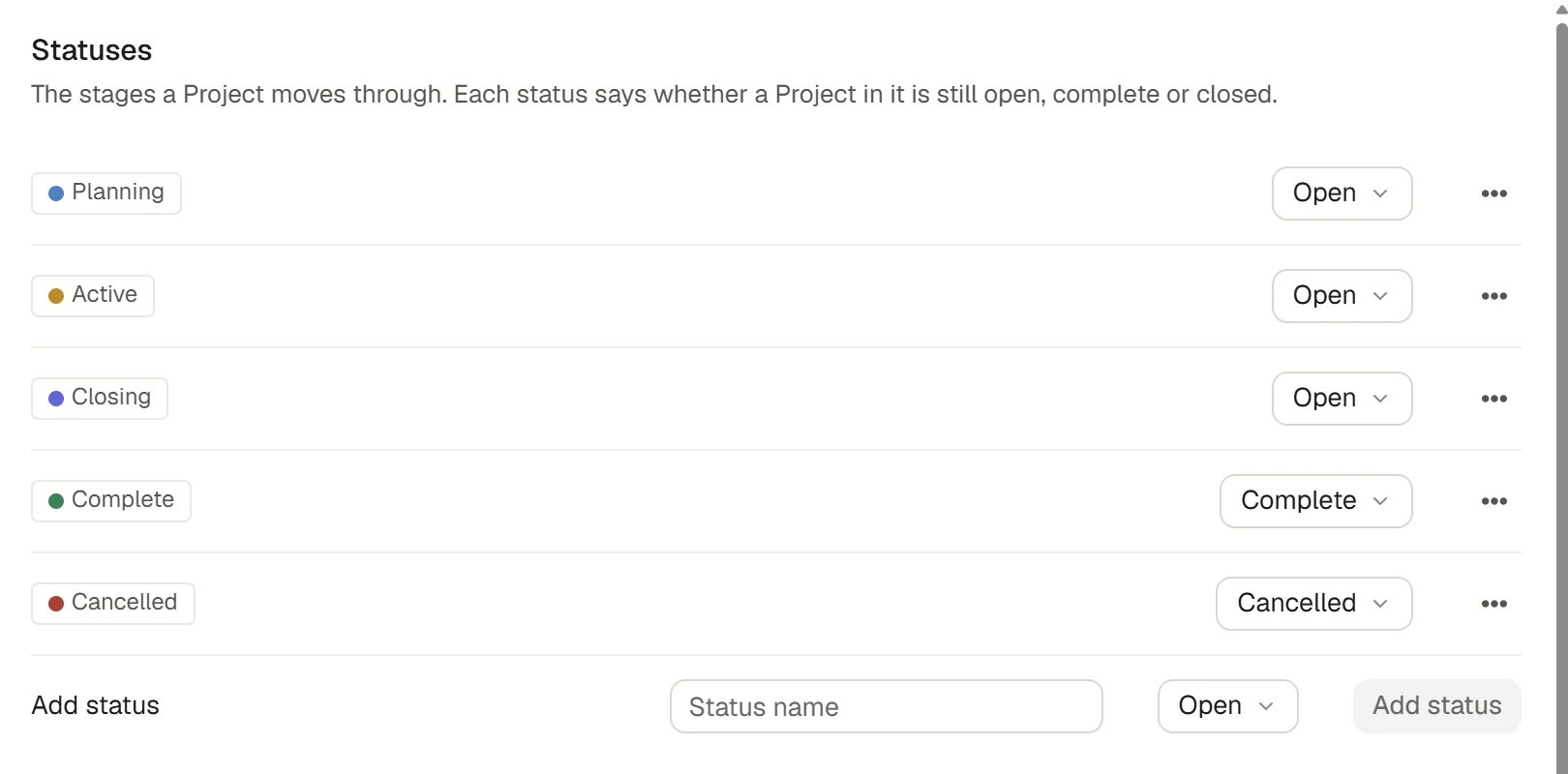
A Project’s Status is the stage it is in. Each status has a name, a colour and a lifecycle meaning that tells Saphion whether a Project in it is still open, complete or closed. New Organisations start with five statuses:1
Add a status
In the Add status row, type a Status name, choose its lifecycle and choose Add status. Saphion picks a colour for it.
2
Choose its lifecycle
Use the select beside the status. The choices are in the table in How it works. Saphion refuses to change what a status means while Projects are in it.
3
Rename, recolour or reorder it
Open the ⋯ menu on a status. Rename edits the name in place, Colour offers the colour palette, and Move up and Move down change the order the statuses are listed in.
4
Delete one you no longer use
Choose Delete from the same menu. Projects in that status must be moved to another first, and Saphion refuses the delete while any are in it.
Choose what a new Project must state
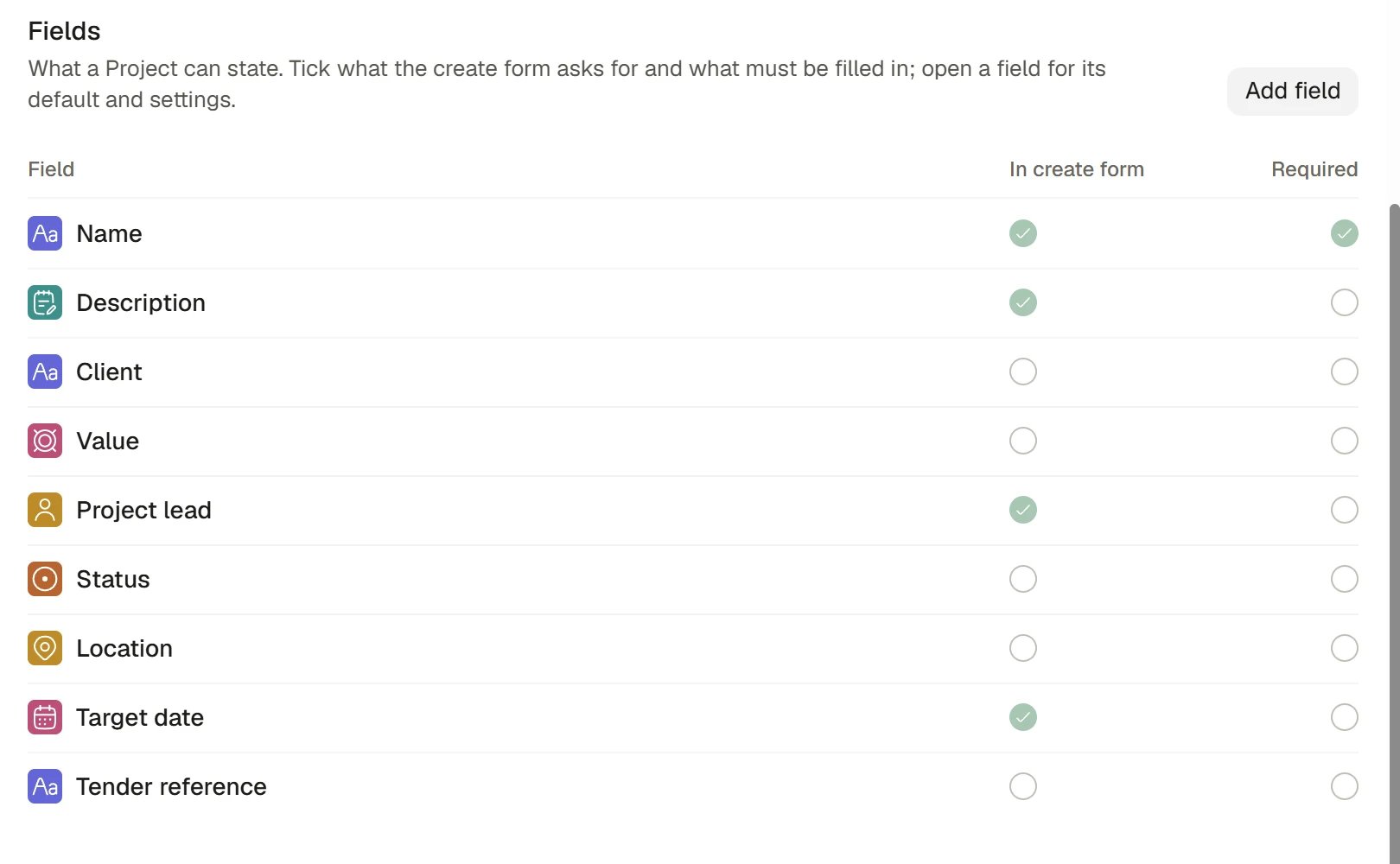
The Fields table lists every fact a Project can state, with its type and two ticks.1
Find the field
The first row is Name, which every Project must have. It is always in the form and always required. Below it come the Project’s own facts, such as Description, Client, Value, Project lead, Status, Location and Target date, followed by any other Project fields your Organisation has.
2
Tick In create form
The field is then asked for in the form that creates a Project.
3
Tick Required
A Project cannot be created until it states that fact. A required field is also in the form.
4
Choose Save
The Save button is at the foot of the section.
Project fields
Open a field to set its default
Select a row to open a panel beside the table.- Enabled turns the field on or off. A disabled field is not offered when a Project is created, and Saphion refuses a value submitted for it. Description, Project lead, Target date and Status are part of every Project and have no switch. A required field cannot be disabled.
- Default is what a new Project starts with. It applies when the field is enabled and nobody states a value.
- Edit field changes the field’s name, type, choices and who can see it. The Project’s own facts, such as Client, are part of every Project and have only the two ticks.
Add a Project field
Choose Add field at the top right of the table. Project fields hold one value on the Project: text, a number (including money, percent, rating and duration), a status, a date or a link. An Organisation can define up to 40 Project fields. A field is never required by its definition. Tick Required to ask for it at creation.Choose where Project numbers come from
The Project number section appears when your Organisation has the Project number field. Choose a source under Comes from:
A number that Saphion issues or a system owns cannot be required of a new Project, because nobody states it.
Name a system that owns the actual dates
The Actual start and finish section appears when your Organisation has those fields. A person normally confirms them, and a change of status only suggests the day. To give one to a connected system, enter its name in Actual start comes from or Actual finish comes from. The date is then read-only in Saphion and shows Managed by that system. Leave the box blank for manual entry.How it works
- The rules apply to every way of making a Project: the Projects page, Beacon, a product’s own creation and an import.
Lifecycle meanings
Every status carries one of five lifecycle meanings, and the meaning decides whether a Project in it is still open to work. The five statuses a new Organisation starts with are shown against them. When you change a status, Saphion applies these rules:
Names, colours and order are yours. The five lifecycle meanings are Saphion’s, so every Organisation’s statuses behave the same way. At least one status must be Open, or no Project could be worked on. Two statuses cannot share a name.
What is enforced where
Every way of making a Project asks the same question: the Projects page, Beacon, a product that creates Projects, and an import. A Project that lacks a required fact is refused at all of them, in the same words.- Your changes are saved against the version you opened. If another Admin saved first, Saphion tells you instead of overwriting theirs.
- Changes to these settings are recorded in Audit.
Ask Beacon
Beacon can read your statuses and what a new Project must state, but it never changes them. An Admin does that here.- “What does a new Project need before I can create it?”
- “Which statuses can a Project have in our Organisation?”
FAQ
Why can't I tick Required for a field?
Why can't I tick Required for a field?
The field may be switched off, owned by a connected system, or its number may be issued by Saphion. A field must be enabled to be required, and nobody can state a value that a system owns.
Saphion will not change a status's lifecycle.
Saphion will not change a status's lifecycle.
Projects are in it. Saphion says how many and asks you to move them to another status first, because the lifecycle decides whether a Project counts as open or closed. Deleting a status has the same rule.
Can I change how existing Projects are numbered?
Can I change how existing Projects are numbered?
Changing the source affects the Projects created afterwards. Numbers already on Projects stay as they are.
Related
- Projects: Create and run a Project.
- Teams and Permissions: The Create projects power.
- Audit: Who changed these settings.